
10 Proven Ways to Cut Your AWS Lambda Cost.

Hey Builders,
If you are a serverless builder like me, you would know serverless is cheap, fast, and scales endlessly most of the time.
Today, let’s talk about Lambda costs because that $200/month bill can quickly become $20,000 if you’re not careful.
Here’s the thing about Lambda pricing: it seems simple until it isn’t. You pay for requests and duration.
But the real cost drivers are hiding in plain sight: concurrency spikes, big package sizes, and functions sitting idle waiting for database queries, etc.
A function that runs for 500ms instead of 200ms doesn’t sound like much, but multiply that by 10 million invocations, and you’re paying hundreds of extra dollars every month.
In this issue, I’m sharing 10 practical tips that can cut your Lambda costs significantly. These strategies will help you optimize without sacrificing performance.
Let’s get started…
Tip 1: Right-Size Your Function Memory
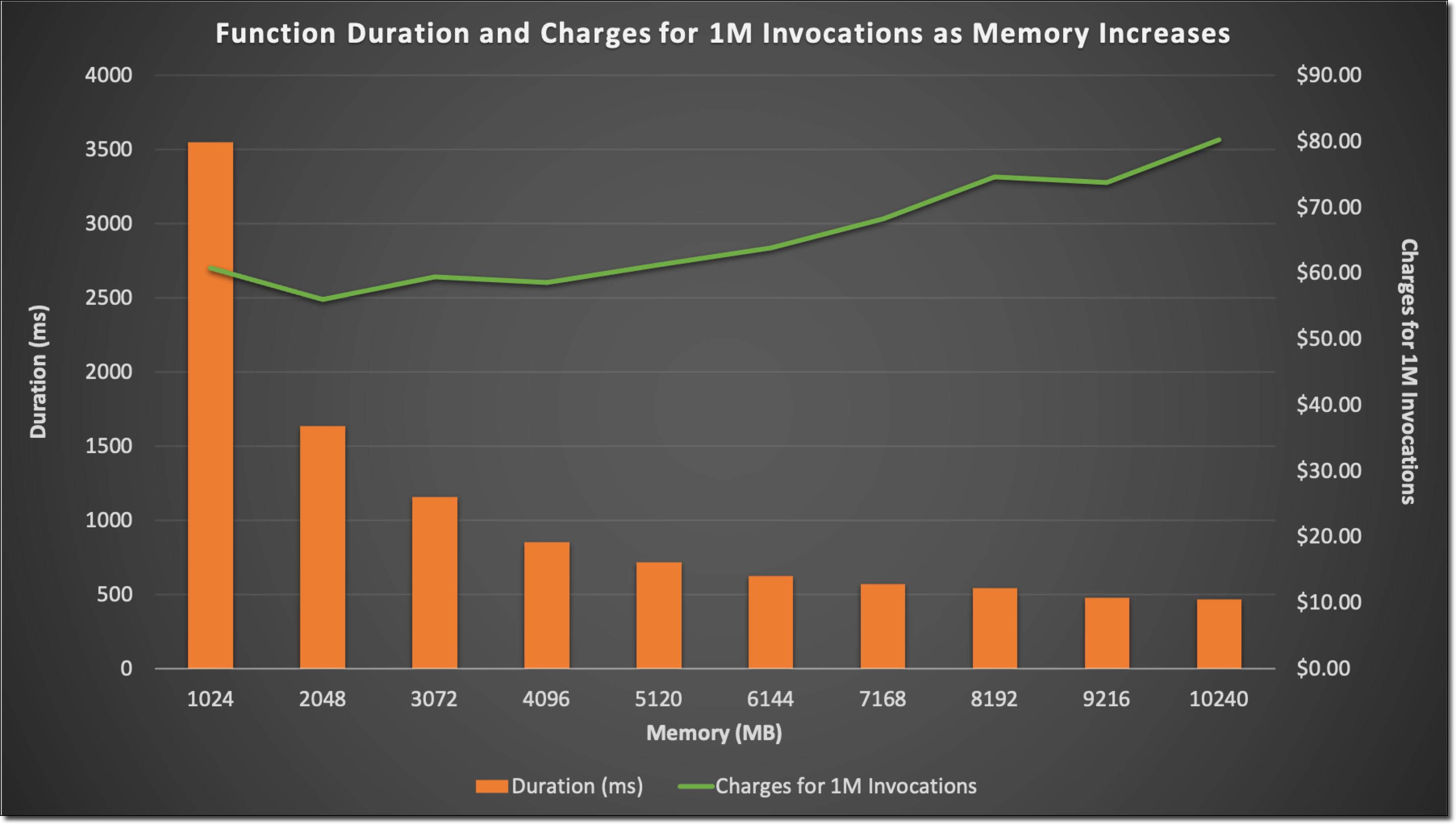
This is counterintuitive, but hear me out: increasing your Lambda memory allocation can actually reduce your total cost.
Why? Because memory directly affects CPU power and network throughput. A function with 512MB might take 1000ms to complete, while the same function with 1024MB finishes in 400ms. Since Lambda charges for GB-seconds, you often come out ahead by going bigger.
How to find the sweet spot: Run your function at different memory settings (128MB, 256MB, 512MB, 1024MB, etc.) and measure the actual execution time. Calculate the cost for each configuration using this formula:
Cost = (Memory in GB) × (Duration in seconds) × (Price per GB-second)The lowest result is your winner.
This is a good read from the official AWS blogs on how memory increases the performance of Lambda functions.
Tip 2: Reduce Cold Starts
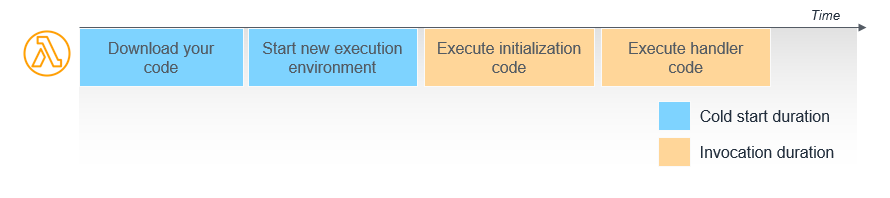
Cold starts happen when Lambda needs to spin up a new execution environment. They’re slow, and they cost you money.
In recent announcements, AWS Lambda standardizes billing for INIT Phase, AWS has started to charge for cold start. Before, it wasn’t the case.
Two strategies that work:
Provisioned Concurrency: Keeps a set number of execution environments warm and ready. Only use this for critical, latency-sensitive functions. It costs significantly more than on-demand.
Choose the right runtime: Interpreted languages like Python and Node.js have faster cold starts than compiled languages like Java. If cold starts are killing you, consider switching runtimes.
Tip 3: Use AWS Lambda Power Tuning
Stop guessing at the right memory configuration. Let automation do it for you.
The AWS Lambda Power Tuning tool runs your function at multiple memory levels, measures performance, and tells you the optimal configuration for either cost or speed. It’s an open-source Step Functions state machine that saves hours of manual testing.
Run it once per function, implement the recommendations, and watch your costs drop.
GitHub Link: https://github.com/alexcasalboni/aws-lambda-power-tuning
Tip 4: Keep Your Package Size Small
Every megabyte in your deployment package adds to cold start time, which adds to execution duration, which adds to your bill.
Quick wins:
Remove unused dependencies (do you really need that entire SDK?)
Use Lambda Layers for shared code across multiple functions
Minify and tree-shake your code if you’re using JavaScript
Exclude dev dependencies from production builds
Aim for deployment packages under 10MB when possible. Your cold starts will thank you.
Tip 5: Optimize Function Duration
Lambda charges by the millisecond, so every optimization counts.
Move the right workloads elsewhere:
Heavy data processing → AWS Fargate or ECS
Complex orchestration → Step Functions
High-throughput data operations → DynamoDB Streams or Kinesis
For workloads that stay in Lambda:
Use async processing when you don’t need immediate results
Batch operations instead of processing items one at a time
Offload CPU-intensive tasks to dedicated compute services
The goal isn’t to avoid Lambda—it’s to use Lambda for what it does best: short, event-driven tasks.
Tip 6: Use Graviton2/3 Lambda Functions
ARM-based Graviton processors cost 20% less than x86 and often deliver better performance.
Switching is usually as simple as changing your function architecture from x86_64 to arm64. Most modern runtimes and libraries support ARM without any code changes.
Quick compatibility check: Test your function on ARM in a dev environment first. 99% of the time, it just works.
Tip 7: Limit Over-Invocation
Unnecessary invocations are silent budget killers.
Common culprits:
Aggressive retries: Lambda retries failed async invocations twice by default. Add a Dead Letter Queue (DLQ) to catch persistent failures instead of retrying forever.
Duplicate triggers: Check your event source mappings. Is the same message triggering multiple functions?
No filtering: Use event filtering on SQS, SNS, and EventBridge to prevent functions from running when they don’t need to.
One misconfigured retry policy can turn a $50/month function into a $500/month disaster.
Tip 8: Cache Smartly
Stop making the same database queries over and over.
Three caching strategies:
Lambda Extensions: Cache data in-memory between invocations (works for warm containers)
Amazon RDS Proxy: Manages connection pooling so you’re not creating new database connections on every invocation
DynamoDB DAX: Microsecond latency for DynamoDB reads with built-in caching
Bonus tip: Reuse database connections across invocations by initializing them outside your handler function. Lambda containers stay warm for several minutes, so you’ll save connection overhead on subsequent invocations.
Tip 9: Use Step Functions for Long Workflows
If your Lambda function runs for more than a minute, you’re probably paying for a lot of idle time.
Step Functions let you break long processes into smaller tasks. Instead of one function running for 5 minutes (and billing for all 5), you run five 1-minute functions with Step Functions coordinating between them. You only pay for actual compute time, not waiting time.
Perfect for workflows that involve external API calls, approval steps, or processing large datasets in stages.
Tip 10: Monitor with CloudWatch + Cost Explorer
You can’t optimize what you don’t measure.
Set up monitoring for:
Function duration (watch for trends over time)
Error rates (errors that trigger retries = wasted money)
Concurrent executions (are you hitting limits unexpectedly?)
Cost per function (identify your biggest spenders)
Set CloudWatch alarms for unusual spikes in invocations or duration. Catching a runaway function early can save thousands.
Pro tip: Use AWS Cost Explorer’s “Group by” feature to break down Lambda costs by function name. You’ll quickly spot which functions need optimization.
Keep Optimizing
Lambda’s pay-per-use model is powerful, but only if you use it smartly. Start with the tips that apply to your highest-traffic functions, measure the impact, and iterate.
Resources to bookmark:
AWS Lambda Pricing Calculator – Model costs before deployment
AWS Lambda Power Tuning Tool – Automated optimization
Understanding and Remediating Cold Starts: An AWS Lambda Perspective
Conclusion
Got a Lambda cost challenge you’re wrestling with? Hit reply and tell me about it. I read every response and often feature reader questions in future issues.
Until next time, keep building in the cloud.
Solid breakdown on the memroy allocation paradox. That tip about bumping up Lambda memory to cut costs threw me at first, but its kinda obvious once the math kicks in. I've had functoins that saved ~40% just by doubling memory and halving duration. Also, the cold start billing change is a sneaky one that most folks dunno about yet.
Great article. I implemented the memory allocation and had the same shocking (for good) results. Cobtrolling cold start and over retries allowed me to lower the cost. I will see if I can implement the other ones! Great resource