💰19 Ways to Cut your Cloud Cost in Half!
Without Compromising Performance. And some great resources and tools from around the community.

Is your company bleeding in cloud bills? You’re not alone. Public cloud waste in 2025 is typically estimated at 20–30% of total cloud spend, with some surveys and models suggesting even higher waste in many organizations.
Organizations waste an average of 30% of their cloud spend on unused or poorly optimized resources. The good news is that most cost optimization doesn’t require deep technical expertise. Just awareness and consistent actions.
This week in The Cloud Handbook, we are going to cover the best practical tips to reduce your cloud costs immediately.
Let’s get started.
1. Identify and Delete Idle Resources
Unused EC2 instances, forgotten load balancers, and orphaned EBS volumes are silent budget killers. Set up a weekly audit process to identify resources that haven’t been accessed in 30+ days. Most cloud providers offer native tools to track resource utilization. Use them more often. In many cases, developers spin up infrastructure without knowing the business side of it.
2. Right-Size your Instances
This is super important. Maybe you don’t need that m5.2xlarge instance you provisioned two years ago? Instances are charged based on per hour and their sizes. Your application probably doesn’t need it anymore.
Monitor CPU, memory, and network utilization over 2-4 weeks, then downsize accordingly. Even dropping one instance size can save 30-50% on that resource.
This tool is one of my favorites to compare different EC2 instances:
3. Turn Off Non-Production Environments
Development and staging environments don’t need to run 24/7. Automate shutdown schedules for nights and weekends. This single change typically saves 65-75% on non-production infrastructure costs.
On AWS, you can easily start and stop the EC2 using the following guide:
Stop and start EC2 instances automatically on a schedule using Quick Setup
4. Use Reserved Instances or Savings Plans
For stable, predictable workloads, commit to 1-3 year terms for discounts of 30-72%. AWS provides a discount up to 72% on reserved instances.

Start conservatively with your baseline usage and scale up your commitments as you gain confidence in your patterns.
5. Leverage Spot Instances for Fault-Tolerant Workloads
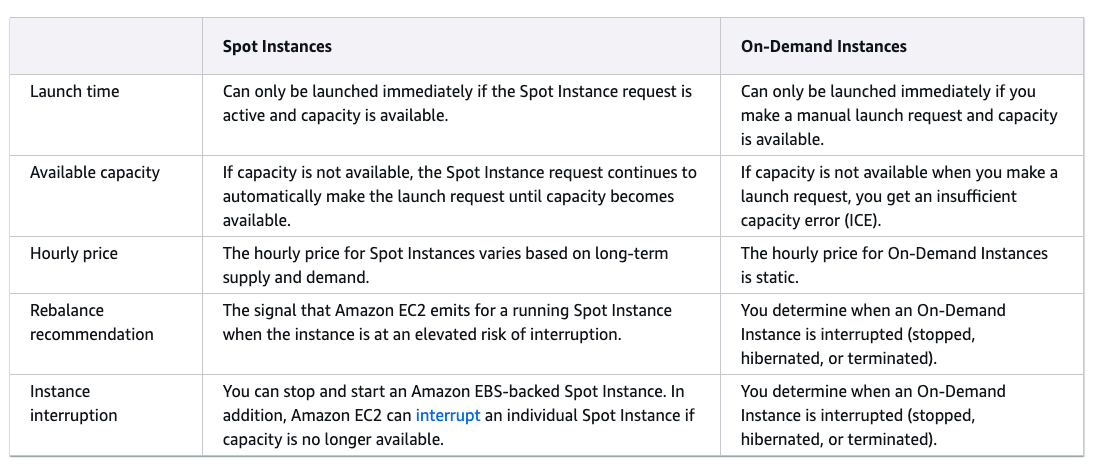
AWS Spot Instances are unused EC2 compute capacity that can be purchased at a discount of up to 90% compared to On-Demand prices. Batch processing, CI/CD pipelines, and data analysis jobs are perfect for spot instances up to 90% discounts. Yes, they can be interrupted, but for stateless workloads, the savings are worth the architecture adjustments.
You can visit the pricing page and calculate your pricing. Prices are updated every 5 minutes there.
Spot instances come up with some limitations compared to on-demand instances. Here are the differences: